
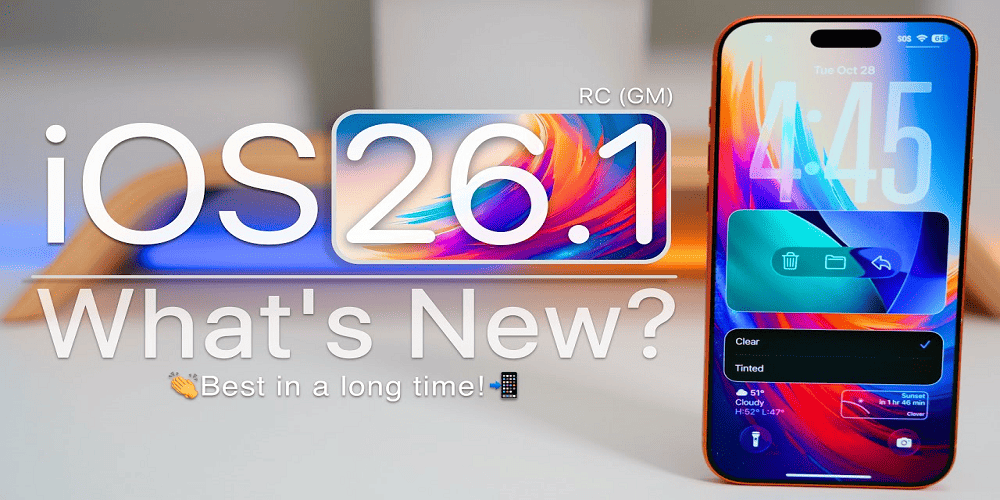
The upcoming iOS 26.1 update from Apple is poised to build on the significant changes introduced in iOS 26, refining design elements, expanding language support, and adding deeper customization for iPhone users. While iOS 26 delivered a bold new aesthetic and many major features, version 26.1 is shaping up to be the first major “pointrelease” of this cycle, intended to polish, stabilize and extend functionality. This article explores what’s new in iOS 26.1, how it compares to iOS 26, what devices are supported, how to prepare, and what potential drawbacks or issues to be aware of.
What Was iOS 26? – A Recap
Before diving into the specifics of 26.1, it’s helpful to recap what iOS 26 brought to the table, since 26.1 is largely incremental.
- iOS 26 introduced a new design language called Liquid Glass, which emphasizes translucent, refractive, fluid interfaces across Lock Screen, Home Screen, system apps and more. (Apple)
- It brought enhanced support for Apple Intelligence, including visual intelligence that lets your iPhone analyze content on‐screen, contextual capabilities, and improved translation features. (Apple)
- Major updates across core apps: the Phone, Messages, Maps, Wallet, CarPlay and more received meaningful improvements in user experience and functionality. (Apple)
- Compatibility: iOS 26 supports iPhones from certain recent generations (for instance, iPhone 11 and newer) (according to Apple’s published list). (Apple)
- However, large updates like this often carry a few initial bugs and user complaints (e.g., interface legibility, calendar/search issues) in early days. (Cinco Días)
In short: iOS 26 was ambitious, visually rich, and packed with features. But by design, the first point update—iOS 26.1—is meant to refine and stabilize.
What’s New in iOS 26.1
Here’s a deep dive into the key changes, refinements and additions in iOS 26.1. Some features were already previewed in its release‐candidate or beta builds.
Design & Customisation Refinements
- Liquid Glass opacity toggle: One of the most high-profile tweaks. Users will now be able to choose between a “Clear” (high transparency) or “Tinted” (more opaque/frosted) variant of the Liquid Glass material in Settings → Display & Brightness → Liquid Glass. This addresses legibility and contrast concerns some users raised. (9to5Mac)
- Lock Screen Camera Swipe toggle: For those who found the always-on “swipe to open camera from lock screen” gesture too prone to accidental activations, iOS 26.1 introduces a setting to disable it. Settings → Camera → Lock Screen Swipe to Open Camera. (9to5Mac)
- Alarm interface adjustment: In the Clock app, the “Stop/Snooze” interface has been modified. Instead of large tappable buttons that many users found too easy to hit by mistake, iOS 26.1 introduces a “Slide to Stop” gesture for alarms and timers to reduce accidental dismissals. (9to5Mac)
- Other UI tweaks: Minor visual refinements in Calendar (colour tags behind events), Safari (wider tab bar), Phone dial pad adopting more of Liquid Glass styling, Photos app video scrubber improved. (AppleInsider)
Feature & System Improvements
- Language & translation support: iOS 26.1 expands the roster of languages supported by Live Translation and Apple Intelligence. For example, Chinese (Simplified/Traditional), Japanese, Korean, Danish, Dutch, Norwegian, Portuguese (Portugal), Swedish, Turkish, Vietnamese. (AppleInsider)
- Third-party accessory / wearable compatibility hints: Code in the beta suggests support for “Notification Forwarding” and improved pairing frameworks for non-Apple smartwatches and accessories. This could allow notifications from iPhone to be forwarded to third-party devices. (Macworld)
- Cloud backup / photo upload improvements: For third-party photo apps, iOS 26.1 introduces a new PhotoKit framework extension, “Background Resource Upload”, enabling smoother cloud-backup experiences in third-party apps. (BGR)
- Performance & stability enhancements: The update incorporates bug fixes, refinements and under‐the‐hood improvements to enhance battery life, network stability, UI responsiveness. Some early testers reported battery life dips in beta versions, so Apple is expected to address those. (Geeky Gadgets)
Release Timeline & Availability
- Beta versions of iOS 26.1 were seeded to developers and public testers in September and October 2025. (9to5Mac)
- The Release Candidate (RC) build was distributed on October 28, 2025 ahead of wider public rollout. (MacRumors)
- General public release is expected early November 2025 (or late October in some regions) depending on region and carrier rollout. (MacRumors)
Compatibility & Device Support
iOS 26 was supported on iPhone 11 and newer, plus certain models of iPhone SE and iPhone 12 etc. (Apple) It is reasonable to expect iOS 26.1 to follow the same device support list, i.e., devices that currently run iOS 26. If your iPhone supports iOS 26, it should support 26.1.
However, if you have an older device (for example iPhone XS, XR or older) which did not support iOS 26, then iOS 26.1 will almost certainly not be available for you. (Apple)
Why You Might Want to Update
Here are the main reasons to consider upgrading to iOS 26.1 as soon as it becomes available:
- Fine-tuned UI and usability: If you felt iOS 26’s new design (Liquid Glass) was a bit too transparent or “glassy”, the new toggle gives you a more legible alternative.
- Greater language & accessory support: For users who use translation features, AirPods, or third-party wearables, the expanded language and accessory compatibility matter.
- Stability and bug fixes: Since major releases often carry early bugs or compatibility issues, a point release like 26.1 can offer a smoother experience.
- Impoved accessibility: Features like the ability to disable the camera swipe on the lock screen and the refined alarm interface may enhance day-to-day usability, especially for those who found the previous gestures problematic.
- Future-proofing apps: If you develop or use apps that integrate with the newest iOS frameworks (PhotoKit background upload, etc.), updating ensures compatibility.
Why You Might Wait or Hold Off
- Early adoption risk: Although 26.1 refines things, initial public roll-outs can still have unanticipated bugs—some users prefer to wait a few days or weeks to let others report issues. As one user on MacRumors put it:
“I was burned too many times with earlier iOS upgrades … I always hold off for x.1 version which usually is released mid October.” (MacRumors Forums)
- Battery or performance concerns: Some early beta testers of iOS 26.1 reported reduced battery life or other performance anomalies. (Geeky Gadgets)
- App compatibility: If you rely on niche or mission-critical apps, waiting ensures that those apps have tuned for the new OS before you upgrade.
- Storage and update size: Large OS updates require both free space and downtime while installing. For users with limited storage or older devices, planning ahead is wise.
How to Prepare for the Update (Best Practices)
Here’s a checklist to ensure a smooth update when iOS 26.1 becomes available:
- Back up your iPhone – Use iCloud or local backup via Finder/iTunes, so you have a restore point if anything goes wrong.
- Check available storage – Ensure you have enough free space for the update (typically several gigabytes).
- Update your apps – Before installing the OS update, update all your apps via App Store so they’re compatible.
- Check battery and charging status – Install while connected to power and preferably in a stable WiFi environment.
- Review key settings after update – After installing, review new toggles and settings under Settings → Display & Brightness (Liquid Glass), Settings → Camera (Lock Screen swipe), and so on.
- Monitor battery / performance – After updating, keep an eye on battery usage and app performance. If you notice issues, you may want to wait for a follow-up update.
Potential Issues & What to Watch For
Even though iOS 26.1 aims to refine the experience, there are a few areas to be aware of:
- Battery drain or performance impact: As noted, beta versions showed reports of decreased battery life. While Apple is likely to mitigate this before public release, keep a watchful eye. (Geeky Gadgets)
- App compatibility hiccups: Some third-party apps may not yet handle the new UI material (Liquid Glass) or background upload frameworks smoothly.
- Legacy device limitations: If your device is on the cusp of compatibility, you might encounter slower performance or may not be supported at all.
- User interface legibility: Despite the new toggle, some users who prefer the more opaque look may still find the default glassy design less comfortable, especially in bright light.
- Regional variation & rollout delay: Features like live translation or accessory notifications may roll out region by region, or carriers may delay the update in some markets.
- Backup & restore risks: As always with major OS updates, ensure your data is backed up before updating. In worst cases, you may need to restore your device via computer.
What This Means for Various User Types
For the everyday user
If you use your iPhone primarily for messaging, photos, streaming, and don’t tinker much with settings, iOS 26.1 offers meaningful usability and visual tweaks worth the update. The new toggle for Liquid Glass and improved translation support may enhance your experience immediately.
For power users / professionals
If you rely on your device heavily for speed, battery longevity, professional apps, or accessories (e.g., external mics, third-party wearables), waiting until version 26.1 is stable (and perhaps even 26.1.1) might be prudent. Meanwhile, you can test in a secondary device.
For developers & accessory makers
If you build apps or hardware that integrate with iOS, iOS 26.1 is significant. The expanded API support (e.g., PhotoKit background upload extension, accessory frameworks) gives new possibilities. Be sure to test against beta SDKs and review developer release notes. (Apple Developer)
Frequently Asked Questions (FAQs)
Here are some of the common questions users are asking about iOS 26.1.
Q: When will iOS 26.1 be released to the public?
A: The public release is expected in early November 2025 (or late October in some regions) after the release-candidate build. (MacRumors)
Q: Which iPhones will support iOS 26.1?
A: iOS 26.1 follows the compatibility list of iOS 26. That means iPhones that are supported for iOS 26 will also get 26.1. Older models that did not get iOS 26 will not be eligible. (Apple)
Q: What’s the big change in Liquid Glass in iOS 26.1?
A: The big change is the ability to choose between a “Clear” high-transparency mode and a “Tinted” more opaque/frosted mode for the Liquid Glass material. This helps with legibility and personal preference. (9to5Mac)
Q: Will iOS 26.1 fix bugs introduced in iOS 26?
A: Yes — among its goals are bug fixes, performance improvements, and user experience refinements. For example, iOS 26 had some reported issues (e.g., calendar search not working) which Apple is addressing in 26.1. (Cinco Días)
Q: Should I upgrade right away or wait?
A: If you’re comfortable and your device supports it, upgrading is fine and recommended for improved features. If you rely on stability, battery performance, or critical apps, you may consider waiting for initial user feedback or a follow-up minor update.
Q: Are there any new translation or language features in iOS 26.1?
A: Yes. Live Translation and Apple Intelligence expand support to additional languages including Chinese (Simplified/Traditional), Japanese, Korean, Danish, Dutch, Norwegian, Portuguese (Portugal), Swedish, Turkish, Vietnamese. (AppleInsider)
Q: Will iOS 26.1 support third-party smartwatches or wearables better?
A: Indications in the beta suggest yes — there is code referencing a “Notification Forwarding” feature and accessory pairing frameworks for non-Apple wearables. However, it may be region-limited or initially partial. (Macworld)
Q: How much free storage do I need for iOS 26.1?
A: The exact size will depend on your device and region, but large OS updates often require several gigabytes of free space and ample battery or a power connection. It’s a good idea to free up space before starting the update.
Q: Will my app data or settings be lost?
A: Normally no — upgrading via Apple’s update process preserves your apps, data and settings. However, always backup beforehand to protect against any unexpected issues.
Q: If I have minor battery issues after updating, what should I do?
A: If you experience battery drain or sluggishness post-update, try: letting your device sit for a day (systems often “settle” after an update), checking battery usage in Settings → Battery, updating all apps, restarting the device, or waiting for a subsequent minor update (for example iOS 26.1.1).
Final Thoughts
iOS 26.1 may not be a major new feature leap in the way iOS 26 was, but it serves an important role: refining, stabilizing and customizing the experience of the iPhone at a time when many users are adjusting to big design changes. The ability to toggle the transparency of Liquid Glass, expanded translation and accessory support, and sensible usability tweaks make it a worthwhile update.
For users who upgraded to iOS 26 and found certain aspects less than perfect (legibility, accidental gestures, app behaviour), 26.1 should feel like a thoughtful “reset” in a better direction. On the other hand, if you skipped iOS 26 or are still on an older device, waiting until public roll-out and early feedback may be wise.
When you update, make sure you’re backed up, updated your apps, have free space and a stable connection. After updating, spend a few minutes in Settings to explore the new toggles and review battery and performance over the next day or two.
Leave A Comment
0 Comment