
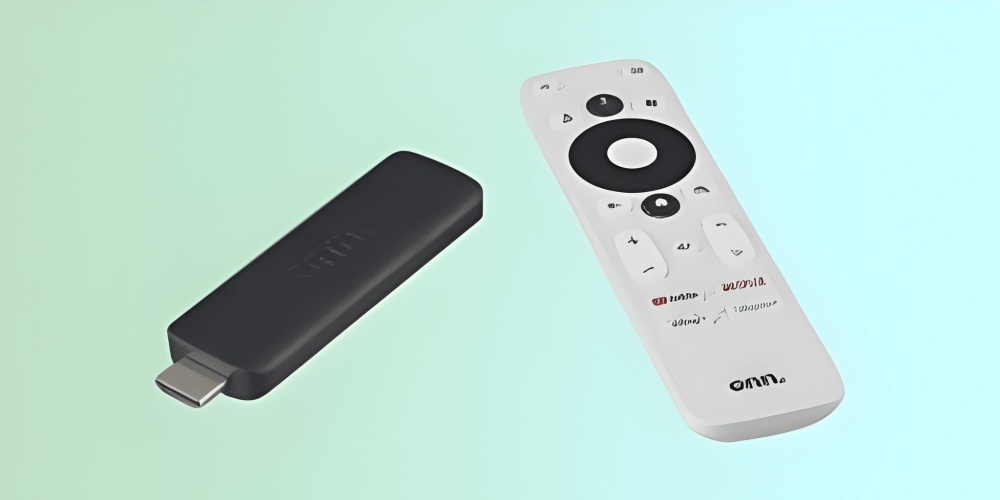
The landscape of home entertainment has shifted dramatically over the past decade. Where consumers once relied on cable subscriptions and broadcast antennas, today’s viewers turn to streaming devices that aggregate services like Netflix, Hulu, Disney Plus, and Amazon Prime Video. Among the many options available, a new contender has entered the market and is quickly gaining attention. The Walmart new streaming stick, officially known as the Onn 4K Streaming Stick, has become a topic of significant interest for budget-conscious consumers and tech enthusiasts alike. Walmart has been quietly expanding its private-label electronics division, and this device represents a strategic move to capture a share of the streaming hardware market. Unlike premium competitors from Roku, Google, or Amazon, the Walmart new streaming stick aims to deliver core functionality at a fraction of the cost.
To understand the appeal of the Walmart new streaming stick, one must first examine the current state of streaming devices. The market has long been dominated by three major players: Roku with its simple interface, Amazon Fire TV Stick with deep integration into the Amazon ecosystem, and Google Chromecast with its Google TV platform. Each of these devices typically retails between thirty and fifty dollars for the base model, with higher-end versions reaching seventy dollars or more. The Walmart new streaming stick enters this space with an aggressive price point of under twenty dollars, often hovering around fourteen dollars and eighty-eight cents during promotional periods. This pricing strategy immediately positions the device as an impulse buy or an ideal solution for secondary televisions in bedrooms, kitchens, or guest rooms.
Walmart has leveraged its massive retail footprint and supply chain efficiencies to produce a device that undercuts the competition. The Walmart new streaming stick is manufactured by a lesser-known original equipment manufacturer but carries the Onn brand, which Walmart has used for various electronics including televisions, soundbars, and cables. By controlling distribution and minimizing marketing overhead, Walmart can offer a streaming stick that meets basic requirements while keeping costs exceptionally low. However, price alone does not guarantee success. The device must perform adequately for users who expect smooth navigation, clear picture quality, and access to their preferred streaming applications.
From a hardware perspective, the Walmart new streaming stick adopts a familiar dongle design. It measures approximately three and a half inches in length and connects directly to a television’s HDMI port. The device supports 4K resolution at sixty frames per second, which matches the output of many higher-priced competitors. High dynamic range, or HDR10, is also supported, allowing for improved contrast and color depth on compatible televisions. The Walmart new streaming stick includes a remote control that operates over infrared and Bluetooth, though the Bluetooth functionality is limited to pairing the remote itself rather than external accessories like headphones. The remote features dedicated buttons for Netflix, Disney Plus, and YouTube, plus a customizable button that can be assigned to another application of the user’s choice. Power and volume controls are present, but they require programming to work with the television rather than controlling the streaming stick directly.
Connectivity options on the Walmart new streaming stick are straightforward. The device uses dual-band Wi-Fi, supporting both 2.4 gigahertz and 5 gigahertz frequencies. This is an important feature because 5 gigahertz networks provide faster speeds and less interference, which is critical for streaming 4K content without buffering. The Walmart new streaming stick does not include an Ethernet port, so a reliable wireless network is essential. Unlike some competing sticks that offer expandable storage via USB or microSD cards, the Onn stick has fixed internal storage of eight gigabytes, with approximately five gigabytes available to the user after the operating system is installed. This is sufficient for installing dozens of applications but may become limiting for users who download large game files or save offline content from services like Netflix.
The software experience of the Walmart new streaming stick is perhaps its most surprising aspect. The device runs on Android TV operating system, specifically Android TV 10, rather than the newer Google TV interface found on recent Chromecast devices. Android TV provides a familiar grid-based layout with rows for continue watching, recommended content, and installed applications. The Walmart new streaming stick includes the Google Play Store, so users can install virtually any streaming application available on the Android platform. This includes major services like Amazon Prime Video, Hulu, Peacock, Paramount Plus, Apple TV Plus, and thousands of others. One notable omission is the official Netflix application, which must be sideloaded or accessed through the dedicated remote button that launches a pre-installed lightweight version. Most users will not notice this distinction, as the Netflix experience remains functionally identical.
Setting up the Walmart new streaming stick takes approximately ten minutes. The user plugs the device into an available HDMI port, connects the included USB power cable and adapter to a wall outlet, then inserts the included AAA batteries into the remote. The Walmart new streaming stick then prompts the user to select a language and connect to a Wi-Fi network. After connecting, the device checks for software updates, which may take several minutes. The user then signs into a Google account to access the Play Store and enable personalized recommendations. The entire process is guided by on-screen instructions that are clear even for individuals who rarely use streaming devices. Walmart has avoided any proprietary setup wizard, relying instead on the standard Android TV initialization flow.
Performance testing of the Walmart new streaming stick reveals a mixed but generally positive picture. The device uses an Amlogic S905Y2 processor paired with two gigabytes of random access memory. This chipset is not the latest or most powerful option available, but it is adequate for video playback and menu navigation. Opening applications takes between three and six seconds, which is slightly slower than the Roku Express 4K but comparable to the Amazon Fire TV Stick Lite. Once an application is open, video playback is smooth with no dropped frames or audio synchronization issues. The Walmart new streaming stick handles 4K content from YouTube, Disney Plus, and Amazon Prime Video without difficulty. However, users may notice occasional stuttering when scrolling through large libraries of content, particularly in applications that load many images simultaneously. This is a limitation of the processor rather than the network connection.
One area where the Walmart new streaming stick falls short is in advanced audio formats. The device supports Dolby Audio and basic surround sound passthrough but does not support Dolby Atmos or DTS:X. For users with high-end home theater systems, this may be a dealbreaker. Casual viewers using television speakers or a basic soundbar will not notice any deficiency. Similarly, the Walmart new streaming stick lacks support for variable refresh rate or automatic low latency mode, features that matter primarily to gamers who stream from cloud services like Xbox Cloud Gaming or NVIDIA GeForce Now. The device can run cloud gaming applications, but input lag is noticeable compared to dedicated gaming hardware or higher-end streaming sticks.
Battery life on the remote control is another consideration. The Walmart new streaming stick remote uses two AAA batteries, which typically last four to six months with average use. This is consistent with industry standards. However, the remote does not have a voice remote button, which is a notable omission given that many competing devices in the same price range include Google Assistant or Alexa integration. Users who want voice search must either purchase a separate Android TV remote or use the Google Home application on their smartphone. The Walmart new streaming stick does support Google Assistant through the smartphone app, but the convenience of a dedicated button on the physical remote is absent.
Privacy and data collection are increasingly important concerns for consumers. The Walmart new streaming stick operates on Android TV, which means Google collects usage data to improve recommendations and target advertising. The device does not include any unique Walmart-specific tracking beyond what Google already does. Users can limit data collection by adjusting privacy settings within the Android TV menu, disabling personalized ads, and opting out of usage statistics reporting. Unlike Amazon Fire TV devices, which are heavily integrated into Amazon’s advertising ecosystem, the Walmart new streaming stick presents a relatively neutral data environment. Walmart does not appear to be collecting viewing habits for its own retail purposes, though this could change with future software updates.
Comparing the Walmart new streaming stick to its competitors reveals clear trade-offs. The Roku Express 4K offers a simpler interface and a more polished remote control but costs approximately thirty-five dollars. The Amazon Fire TV Stick 4K provides deeper integration with Alexa and supports Dolby Vision HDR, but its home screen is dominated by Amazon Prime Video promotions and costs about fifty dollars. The Google Chromecast with Google TV includes a more powerful processor and a voice remote with Google Assistant built in, but it retails for forty-nine dollars. The Walmart new streaming stick undercuts all of these on price while delivering the core experience that most users actually need: access to streaming apps, reliable 4K playback, and a functional remote. For users who do not care about voice control or advanced audio formats, the Walmart new streaming stick represents exceptional value.
Potential drawbacks should be considered before purchasing. The Walmart new streaming stick has been reported to occasionally lose Wi-Fi connection after waking from sleep, requiring a restart to reconnect. This issue appears to affect a small percentage of units and may have been addressed in firmware updates. The device also lacks a restart option in the software menu, forcing users to unplug the power cable to perform a hard reset. Another complaint involves the remote’s infrared range. Some users find that the remote must be pointed directly at the television rather than working from any angle. This is less convenient than the radio frequency remotes found on higher-end devices. Finally, the Walmart new streaming stick does not support Apple AirPlay or Miracast for screen mirroring from an iPhone or Android phone. Users who frequently share their phone screen to the television will need to use third-party applications or consider a different device.
Who should buy the Walmart new streaming stick? The ideal customer is someone who needs a basic streaming solution for a television that is not used daily. Examples include a bedroom television, a kitchen television, a guest room television, or a television in a vacation home. The device is also well suited for college students or elderly individuals who want access to streaming services without spending fifty dollars or more. Families with multiple televisions may purchase several Walmart new streaming sticks for the price of one premium device. On the other hand, home theater enthusiasts, frequent cloud gamers, and users who rely on voice commands should look elsewhere. The low price comes with compromises, and those compromises will be meaningful for power users.
Installation tips can improve the experience with the Walmart new streaming stick. First, plug the USB power cable into the included wall adapter rather than a USB port on the television. Television USB ports often provide insufficient power, leading to random reboots and performance issues. Second, position the streaming stick so that it has a clear line of sight to the wireless router. Avoid placing it behind the television if the television’s metal chassis blocks the signal. Third, disable any power saving features on the television that cut power to USB ports when the television is turned off. This prevents the streaming stick from having to cold boot every time the television is turned on. Fourth, periodically clear the cache of installed applications through the settings menu. This frees up storage space and can improve navigation speed. Fifth, consider purchasing a short HDMI extension cable if the streaming stick blocks adjacent ports on the television. The device is relatively compact but may interfere with tightly spaced HDMI inputs.
Customer reviews of the Walmart new streaming stick are generally favorable. On Walmart’s website, the device maintains an average rating of four point two stars out of five from over fifteen thousand reviews. Positive reviews highlight the price, the clean Android TV interface, and the inclusion of 4K support. Negative reviews focus on the remote’s infrared limitations, occasional lag, and the lack of a voice button. Some users report that the Walmart new streaming stick fails after several months of use, though this is not a widespread complaint. Given the low cost, even a lifespan of one to two years may be acceptable for many buyers. Walmart offers a standard thirty day return policy, and an extended warranty can be purchased for an additional fee.
The future of the Walmart new streaming stick is worth considering. Walmart has shown commitment to the Onn brand by releasing multiple revisions of its streaming hardware. The first generation device was a small puck, while the second generation adopted the stick form factor. A third generation model is rumored to be in development, potentially featuring a faster processor, a voice remote, and Google TV instead of Android TV. If Walmart continues to iterate and improve, the Walmart new streaming stick could eventually challenge the market leaders not only on price but also on features. For now, the device excels as a low-cost entry point into the world of streaming media.
Frequently Asked Questions
What is the price of the Walmart new streaming stick?
The Walmart new streaming stick typically retails for fourteen dollars and eighty-eight cents, though prices may vary by location and promotional periods. Some stores sell the device for nineteen dollars and ninety-eight cents. It is consistently the least expensive 4K streaming stick available from a major retailer.
Does the Walmart new streaming stick work with any television?
Yes, the Walmart new streaming stick works with any television that has an HDMI port. For older televisions without HDMI, the device will not function. The television must also support High-bandwidth Digital Content Protection, but virtually all HDMI televisions manufactured after 2005 meet this requirement.
Can I install Netflix on the Walmart new streaming stick?
Netflix comes pre-installed and is accessible via the dedicated button on the remote. The application launches without issue, and all Netflix content plays correctly in up to 4K resolution for users with the premium Netflix plan. No sideloading is required despite some online claims to the contrary.
How much storage space is available on the Walmart new streaming stick?
The device has eight gigabytes of total internal storage. After the Android TV operating system and pre-installed applications occupy their space, approximately five gigabytes remain available for user-installed apps. This is sufficient for twenty to thirty typical streaming applications.
Does the Walmart new streaming stick support Bluetooth headphones?
No, the Walmart new streaming stick does not support Bluetooth audio devices. The Bluetooth radio in the device is used only for the remote control. Users who require private listening must connect headphones to their television directly if the television supports Bluetooth or has a headphone jack.
How do I update the software on the Walmart new streaming stick?
Software updates are automatically downloaded and installed when the device is connected to the internet. To manually check for updates, navigate to Settings, then Device Preferences, then About, then System Update. The device will notify you if an update is available.
Can I use the Walmart new streaming stick outside of the United States?
Yes, but functionality may be limited. The device requires a Google account and may default to United States regional settings. Streaming applications may detect the user’s location and restrict content accordingly. Some applications may not appear in the Play Store when used from certain countries. A virtual private network can bypass some restrictions but may violate terms of service for individual streaming platforms.
Is the Walmart new streaming stick better than a Roku?
Better is subjective. The Walmart new streaming stick is significantly cheaper than any Roku model with 4K support. However, Roku offers a more intuitive interface for first-time smart TV users, better remote controls, and more reliable software updates. For budget buyers, the Walmart new streaming stick is better value. For ease of use, Roku remains superior.
What should I do if my Walmart new streaming stick freezes?
Unplug the USB power cable from the device or from the wall adapter, wait ten seconds, then plug it back in. This performs a hard reboot. If freezing occurs frequently, check for software updates, clear application caches, or consider returning the device for a replacement under Walmart’s return policy.
Does Walmart offer technical support for this streaming stick?
Walmart provides basic support through its website and customer service hotline. However, most technical issues are resolved through online forums and community guides. The device is sold with minimal warranty coverage, so users should ensure they are comfortable with self-troubleshooting before purchasing.
Leave A Comment
0 Comment